background 개별속성은 단축속성 아래에 적어야 한다. (후자 우선의 원칙)
background:red;
background-clip:padding-box;     // 뒤에 적어야함

background-clip:padding-box;  // 앞에 적으면 속성 적용 x
background:red;
div만 3개 적었을 때 last-child 속성 적용이 안 된다. first-child는 인식하지만 마지막 자식이라는 것을 인식하지 못함
section태그로 감싸주면 div:last-child 가 적용이 된다.
!! 다만 div:nth-child(3) 은 명확하기 때문에 적용이 된다.
<style>
  div:first-child {
  	background:red;
  }

  div:last-chile {
  	background: red;
  }
</style>

<body>
  <section>
    <div class="box1">Hello</div>
    <div class="box2">Hello</div>
    <div class="box3">Hello</div>
  </section
</body>- outline은 border가 아니라 box-sizing: border-box;를 줘야한다.
- outline은 요소에 포함되는 것이 아니라서 크기가 더 커짐
- 만약 버튼을 만들었을 때 outliine은 탭으로 포커스 이동할 때 포커스가 보이지 않음 사용자가 길을 잃을 수 있음
- 포커스가 보이게 하려면 color를 주면 된다. outline을 쓸 때는 주의하자 focus된 상태까지 생각하기
div,
button {
  width: 100px;
  height: 48px;
  line-height: 48px;
  text-align: center;  //글자 가운데
  background: #eee;
  box-sizing: border-box;
 }

/* 밑에 두개 같은 것 */
div:not(:first-chile) {
 margin-top: 20px;
}

div~div {
  margin-top: 20px;
}

.box1 {
  clolr: #fff;
  background: #3a4f50;
  box-shdow: inset 5px 5px #4a5568;
  border: 5px solid #000;  //가장 바깥
}

.box11 {
  color: #fff;
  background: #343f50;
  border: 5px solid #4a5568;
  border-witdh: 5px 0 0 5px;
  outline: 5px solid #000;
}

.box11:focus {
  outline-color: royalblue;
}

<body>
  <button class="box1">Hello</Hello>   //처음
  <button class="box11">Hello</Hello>   //두번째
</body>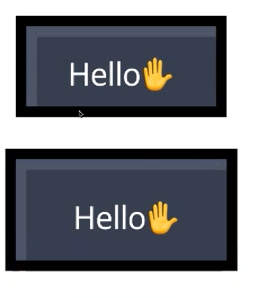
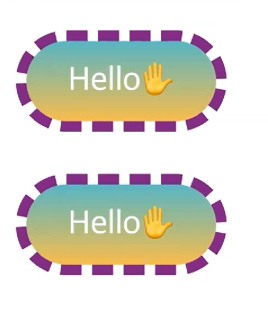
/* background-clip를 이용해서 푼 것 */

.box2 {
  color: #fff;
  border-radius: 24px;
  background: liner-gradient(180deg, rgba(34, 193, 195, 1)
  border: 5px dashed rgb(134, 17, 136);
  background-clip: padding-box;   // 보더 안으로 배경 들어오게
 }

위에 같은 박스 밑에 처럼 가상요소로 박스 넣을 수 있음
/* 가상요소 + position을 이용해서 푸는 방법 */

.box22 {
  color: #fff;
  border-radius: 24px;
  border: 5px dashed rgb(134, 17, 146);
  position: relative;   // 글씨 hello가 밀려나서 부모요소다
  owerflow: hidden;   //튀어나온 배경색 제거
}

.box22::before {
  content: '';
  display: block;
  width:100%
  height: 100%
  background liner-gradient(180deg, rgba(34,194, 195, 1) //그라데이션 정하면 값 주는 홈페이지가 있음
  position: absolute;   //글씨 hello가 밀려나서
  top: 0;
  left: 0;
  z-index: -1; //뒤로 물러나게
  }
'HTML,CSS' 카테고리의 다른 글
| CSS 빔캠프 (0) | 2023.03.10 |
|---|---|
| 텍스트 꾸미기 CSS (2) | 2023.03.02 |
| HTML/CSS 텍스트와 관련된 태그들 (0) | 2023.03.02 |